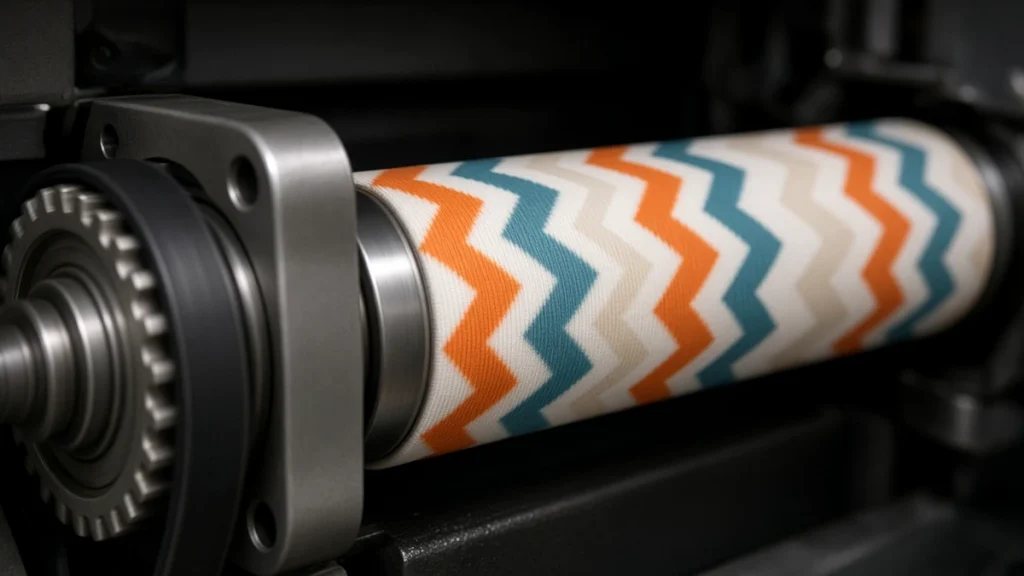
The word "rotary" describes the defining feature of modern sock printing machines: the sock rotates during printing. Understanding the mechanics of a rotary socks printer helps operators load correctly, designers prepare better files and buyers compare machines more intelligently.
The basic principle
A flat printer moves media under a printhead in straight lines. A rotary socks printer instead mounts the tubular product on a cylinder. As the cylinder rotates, the printhead carriage moves along its axis. The combination of rotation and linear movement lets the heads cover the entire surface of the tube.
The roller
Rollers are the foundation of rotary printing. They:
- Hold the sock at a controlled stretch.
- Provide a smooth, stable printing surface.
- Rotate precisely, synchronized with the printheads.
Roller diameter must match the sock. If the roller is too small, the sock sags and prints unevenly. If it is too large, the knit opens and white can show when the sock relaxes. Machines offer different roller sizes for different products; some, like the CO60-100PRO, support a wide diameter range.
Rotation and carriage movement
During printing, the roller turns while the carriage travels slowly along the length. Depending on the machine and print mode, the heads print bands around the circumference, building up the full image. Precise synchronization prevents gaps and overlaps that would show as banding.
Why there is no seam line
Because ink reaches the entire circumference, there is no fold where ink cannot reach, unlike flattened printing. The only "join" is where the artwork's left and right edges meet, which disappears when artwork is prepared correctly. See what is 360 sock printing.
Multi-roller systems
Single-roller machines print one sock at a time. Multi-roller designs add stations so loading happens while printing continues. The CO80-210PRO uses a four-roller rotary system to enable continuous automatic printing. Compare layouts in four-roller vs twin-roller.
Head-to-fabric distance
The distance between printheads and sock surface affects sharpness. Correct roller size and careful loading keep that distance consistent. Wrinkles or bulges change the distance locally and can blur details.
Speed and quality trade-offs
Print modes balance speed and quality by adjusting resolution and passes. Fewer passes print faster; more passes give smoother gradients. A rotary socks printer typically offers several modes; choose based on the design.
Beyond socks
Rotary printing suits any tube: ice sleeves, beanies, neck gaiters and seamless leggings. Larger rotary machines like the CO220-450MAX handle activewear. Read printing ice sleeves on a rotary socks printer.
Rotary vs flatbed with jigs
Flatbed printers with sock-shaped jigs exist, but they print flattened socks and share the side-line problem. Our article on rotary socks printer vs flatbed printing compares the two in detail.
Maintenance of rotary components
- Keep rollers clean of ink and lint.
- Inspect for scratches or dents.
- Keep drive components clean and smooth.
- Follow your supplier's calibration procedures.
Roller care and organization
Rollers are central to print quality on a rotary socks printer, so treat them as precision tools rather than accessories.
- Keep them clean. Ink mist and fibers can build up and transfer to socks. Wipe rollers according to your maintenance routine.
- Store them properly. Use a rack that keeps rollers separated and protected from knocks that could dent or bend them.
- Label sizes clearly so operators always pick the right roller for each sock size.
- Inspect regularly for damage, wear or surface marks.
Loading technique
Even, consistent stretching matters as much as roller size. Train operators to pull socks straight, with the heel and toe positioned in the same place every time. Twisted or uneven socks lead to crooked patterns and poor seam alignment. Practice with test socks before working on orders.
Why roller fit affects color
If a sock is overstretched, the knit opens and white yarn shows through, making colors look lighter. If it is too loose, the sock can move during printing and blur. The right fit keeps fabric flat and stable under the printheads. See 360 sock printer rollers: matching roller size to sock size.
Multi-roller layouts
Machines with several rollers let operators load one roller while another prints. This raises output but means more rollers to manage. Compare layouts in four-roller vs twin-roller socks printer and browse models on the socks printer page.
Questions to ask suppliers
Which roller sizes are available, how are they changed, and are extra rollers available for new products? Ask to see a roller change during a demonstration.
Frequently asked questions
How many roller sizes do I need?
One per sock size range you sell. Many businesses start with two or three common sizes.
Can rollers be custom-made?
Suppliers can often provide custom diameters for special products.
Does rotation speed affect quality?
Yes; speed is matched to print mode. Use the supplier's recommended modes.
Conclusion
A rotary socks printer creates seamless prints by rotating the sock on a precisely sized roller while the printheads travel along its length. Correct roller sizing, careful loading and good artwork make the result flawless. Explore our rotary socks printer models or contact us for details.
Leave A Comment