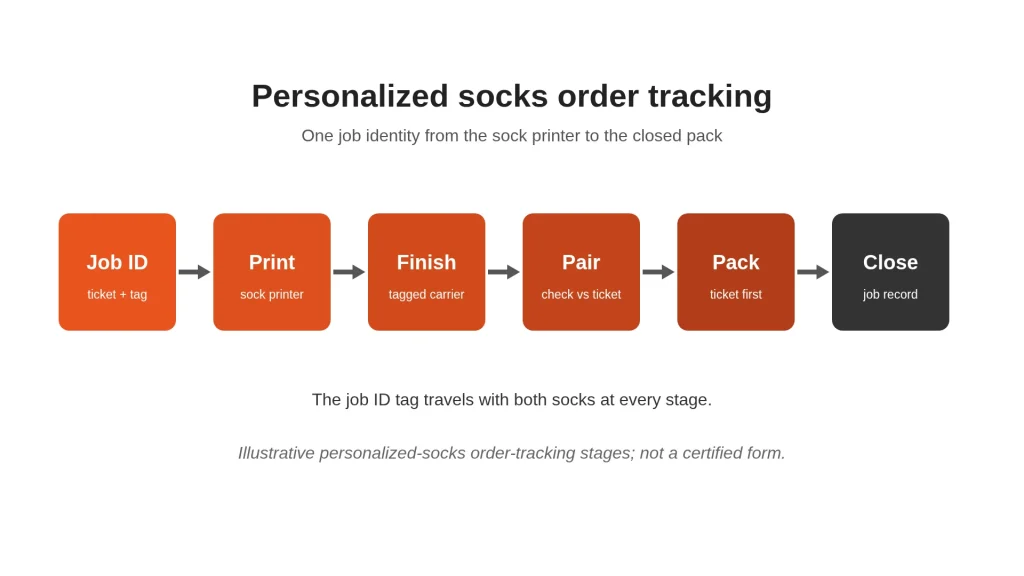
A digital socks printer rarely creates the wrong face or name on purpose. Pairing errors appear later—when two singles leave different trays, when left and right swap during finishing, or when packing relies on memory instead of the job ticket. Personalized socks order tracking keeps each unique name or image tied to one job identity from the first print through finish, pair and pack.
This guide stays on the print-room floor. Store API automation belongs on our socks printer ecommerce workflow page; gift boxes and shipping choices stay on custom socks packaging and fulfillment. Photo cut-outs remain on personalized socks photo printing. The question here is simpler: does every finished pair still match the job that started it?
1. Why unique-name and image jobs fail at pairing
Standard designs can survive a mild mix-up because many pairs look alike. Personalized socks do not. One order carries a customer name; the next a different pet portrait; a third mixes both. Once singles share a bench without labels, operators guess—and guesses become returns.
Failures usually start after the sock printer: unlabeled finishing trays, bins reused without wiping the job ID, left and right files dumped into one pile, or packing from memory. Fix the identity chain first; faster equipment will not repair a broken chain.
2. Job identity fields before the first print
Create the job ticket before blanks reach the digital socks printer. If identity fields disagree with the order screen or artwork folder, stop.
Capture at least:
- Internal job ID (unique per order line or pair set)
- Customer-facing order number
- Size and blank SKU or style
- Artwork file names for left and right (or note that the pair is identical)
- Personalization text exactly as approved
- Quantity, split-ship note, due date or priority
- Finishing route for the fiber and ink system in use
Name files so the ticket and RIP queue share the same tokens. Clean L/R naming is covered in socks printer artwork preparation; here the rule is only that ticket and files agree before print starts.
3. Keeping identity through print → finish
Print identity must travel with the physical socks. A screen row that never reaches the tray is not tracking.
- One job ID per tray or bin whenever practical; if jobs share a cart, use separate labeled cups or clips
- Attach a tag with the job ID through unloading and into the finishing carrier—do not rely on tray color alone
- Keep unfinished and finished goods in labeled zones so a finished batch cannot re-enter the wrong print pile
For how stages connect, see the digital sock printing line overview. Use the validated finishing route for that blank and ink—do not invent temperature or time recipes. Pair lot codes with blank socks incoming inspection when material identity belongs on the same job record.
4. Left–right and pair verification
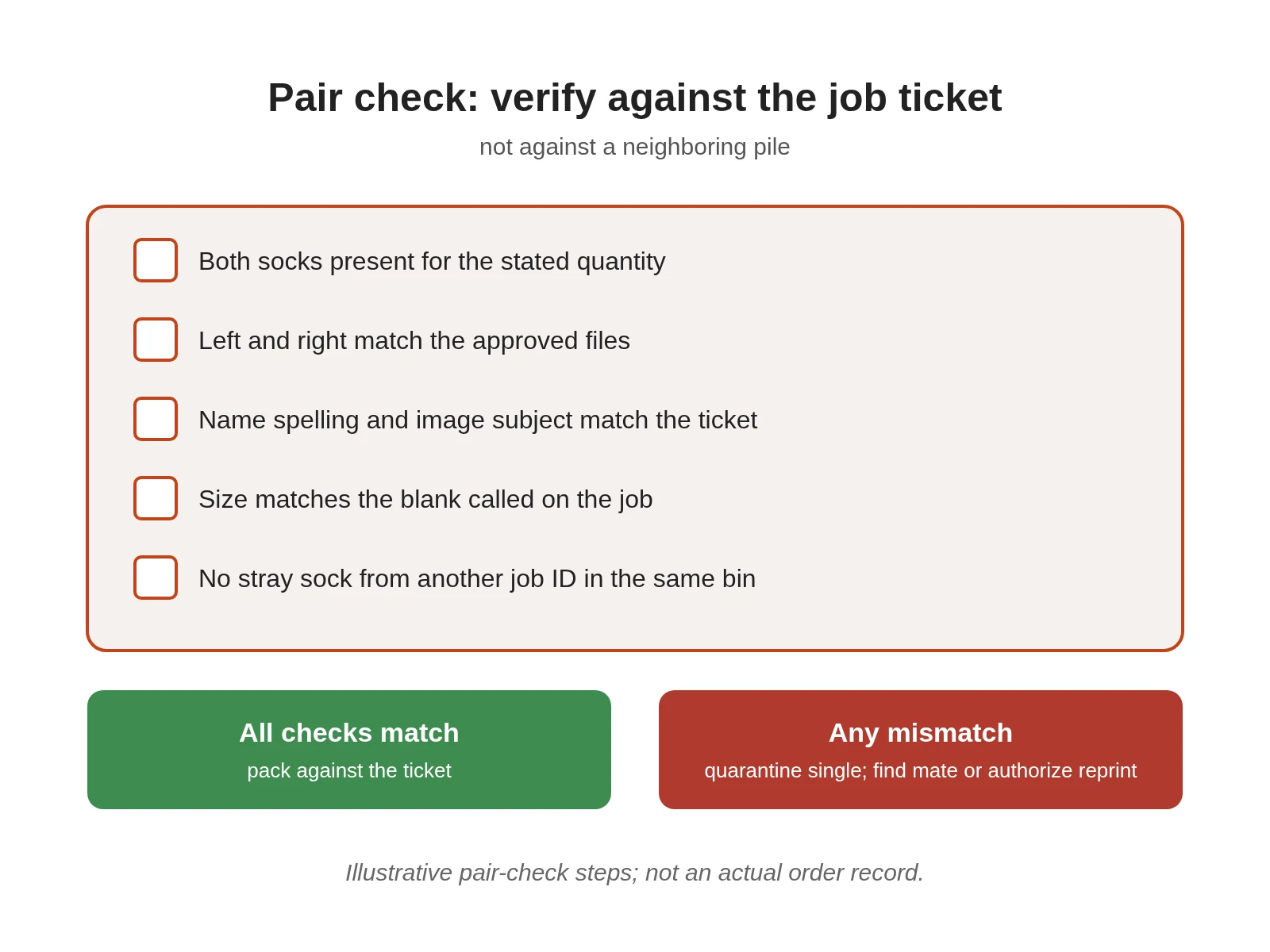
Before packing, verify the pair against the ticket—not against a neighboring pile.
Check:
- Both socks present for the stated quantity
- Left and right match the approved files (identical, mirrored, or different as specified)
- Name spelling and image subject match the ticket
- Size matches the blank called on the job
- No stray sock from another job ID in the same bin
When designs are similar—two black pets, two short names—use the job ID and file name, not a glance. Quarantine mismatched singles until the mate is found or a reprint is authorized. Two acceptable singles from different jobs are not a saleable pair of custom printed socks.
5. Packing against the job ticket (not memory)
Open the ticket or packing slip first. Match the finished pair to that document. Close the pack only after the check.
| Check | Pass rule |
|---|---|
| Job ID | Ticket ID matches the tray or bin tag |
| Design | Name/image matches the approved ticket reference |
| Pair | Left–right rule satisfied; quantity complete |
| Size | Matches the blank/size on the ticket |
| Exceptions | Reprint or split notes cleared or recorded |
Packaging product choices belong on the packaging page linked above. Here the rule is only: pack what the ticket says, then mark the ticket packed.
6. Exception handling: reprint, split orders, rush inserts
Exceptions break tracking when they stay as side conversations.
- Reprint: open a child job ID linked to the original (for example JOB-10452-R1), print a new tag, and do not drop unlabeled reprint socks into the parent bin.
- Split order: give each split its own ticket lines and trays; pack each against its own slip.
- Rush insert: never place a rush pair into someone else’s tray “just for finishing.” Give it a labeled carrier and update the production list.
Record every reprint reason. Patterns improve the line; silent reprints hide them.
7. Simple record that closes the job
A closed job is one you can audit without reconstructing memory.
| Field | What to enter |
|---|---|
| Job identity | Job ID, order number, size, blank SKU, L/R file names |
| Personalization | Approved name/image reference |
| Operator, sock printer used, start/finish time | |
| Finish | Route used, carrier/tag ID with the batch |
| Pair check | Who verified left–right and quantity |
| Pack | Who packed, against which slip version |
| Exceptions | Reprint IDs, splits, holds |
| Close | Packed / Held / Cancelled, with timestamp |
Keep the record short enough that operators complete it. Consistency beats sophistication for print on demand socks and digital print socks alike.
For finished goods instead of an in-house tracking build-out, start from the custom printed socks hub—including no-minimum custom socks for single-pair personalization. Print rooms expanding equipment can review the Colorido sock printer range once floor identity is under control.
Frequently Asked Questions
What is personalized socks order tracking?
It is the print-room practice of assigning a unique job identity to each personalized order and carrying that identity—on tickets, tags and records—through printing, finishing, pairing and packing so the shipped pair matches the approved name or image.
Why do pairing errors happen after a good print?
Because singles often lose their label between unload, finishing and the packing bench. Similar designs then get matched by guesswork. Tracking fails at hand-offs, not usually at the digital socks printer.
Do I need separate left and right job tags?
If left and right files differ, yes—keep both sides labeled until they are verified as a pair. If the pair is identical, one job tag for the set is enough, but still verify quantity and size against the ticket.
How should reprints be tracked?
Open a linked child job ID, print a new tag and treat the reprint as its own line until it rejoins or replaces the parent. Do not drop unlabeled reprint socks into mixed bins.
Is order tracking the same as ecommerce store integration?
No. Store connectors and API automation move orders into a production list; floor tracking keeps physical socks matched to that list through finish and pack. Connect the two, but do not confuse them—see the ecommerce workflow article linked above for the store side.
What belongs on the closing record?
Job ID, personalization reference, print and finish notes, pair-check owner, pack confirmation and any reprint or split IDs. Enough detail to answer “what shipped?” without reconstructing the shift from memory.
Leave A Comment