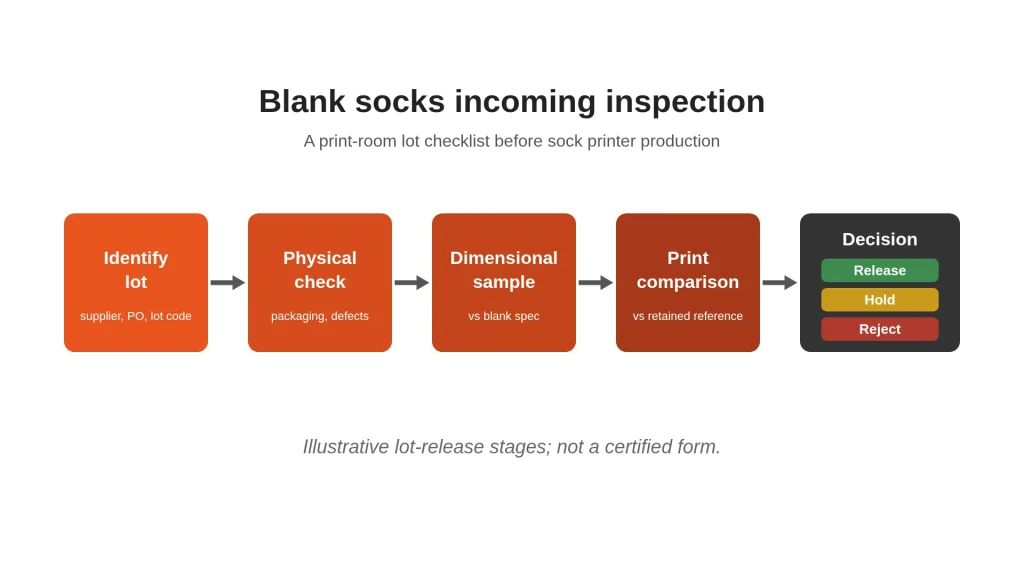
A new carton of blanks looks ready for the sock printer. Until the lot is identified, measured and print-checked, it is not released for production. Blank socks incoming inspection is the lot-release gate between receiving and the first production job—before customer artwork sampling and before any finished-pair count.
This guide expands the short incoming-inspection notes in our blank socks for digital printing article into a full release procedure with record fields. Fiber choice and whiteness targets stay on that page; finished customer-sample approval belongs on the digital printed socks sample approval checklist. The question here is simpler: may this blank lot enter the print room?
1. Why lot release matters before printing starts
Digital socks printer profiles, roller loading and finishing routes assume a blank that matches the approved specification. A quiet change in yarn, surface finish, size or cleanliness can shift color, stretch and defect rates across a run of custom printed socks.
Lot release protects traceability to the supplier delivery, predictable loading on approved rollers, and material consistency for your production profile. Do not skip the gate because the supplier is familiar—release each delivery against the blank specification you buy to.
2. Identify the lot
Record identity first. If labels disagree with the purchase order, stop before sampling.
Capture at least:
- Supplier name and PO or delivery-note number
- Supplier lot or batch code
- Declared fiber composition and blank style or SKU
- Declared size range and color or whiteness grade
- Delivery date, carton count and stated pair quantity
- Your internal blank specification ID or revision
Keep a retained pair from an approved earlier lot nearby. Identity without a physical reference makes the later print comparison harder to judge.
3. Physical checks
Open a planned sample of cartons. Count pairs against the packing list and note shortages or mixed sizes. Confirm bags or cartons arrived sealed and dry, without crushed packs that crease the print face.
Inspect sampled pairs for:
- Dust, lint, oil, yarn fly or packaging residue on the print surface
- Yellowing, uneven base color or stains against your retained white reference
- Holes, dropped stitches, loose yarns, misshapen heels or damaged cuffs
- Unusual odor or contamination that could affect ink or finishing
Quarantine dirty or damaged goods before dimensional or print checks. Keep released stock clean in storage so shelf dust does not undo the result.
4. Dimensional sampling against your blank spec
Measure several pairs from different cartons. Compare cuff, foot and calf dimensions with your approved blank specification, not a casual hand feel. Record within-lot variation as carefully as the average.
Confirm the sampled blanks remain compatible with the roller sizes already approved for that blank style. If dimensions fall outside your chart tolerance, hold the lot. Roller selection itself is covered in our 360 sock printer roller sizes guide; this check only confirms the delivery still matches the blank you already qualified.
Note the sample size, measurement method and any out-of-tolerance pairs. A lot that “mostly fits” is not released until you decide whether outliers are isolated or systemic.
5. Controlled print comparison
Physical appearance alone does not prove print behavior. Print a small sample from the new lot on the same digital socks printer configuration you intend for production: same profile, ink route, print mode and approved roller. Finish it through the validated route for that fiber and ink system—see the digital sock printing line overview for how stages connect. Do not invent a temperature or time recipe to force a pass.
Compare the finished sample with a retained print from an approved earlier lot of the same blank. Check color strength, sharpness, white show-through when stretched, heel or cuff behavior and left–right consistency. This lot check is not customer artwork approval; keep that later step on the sample-approval checklist linked above.
If the comparison fails, hold the lot. Investigate blank change, storage contamination or setting drift, then retest only after the cause is clear.
6. Release, hold or reject — and write it down
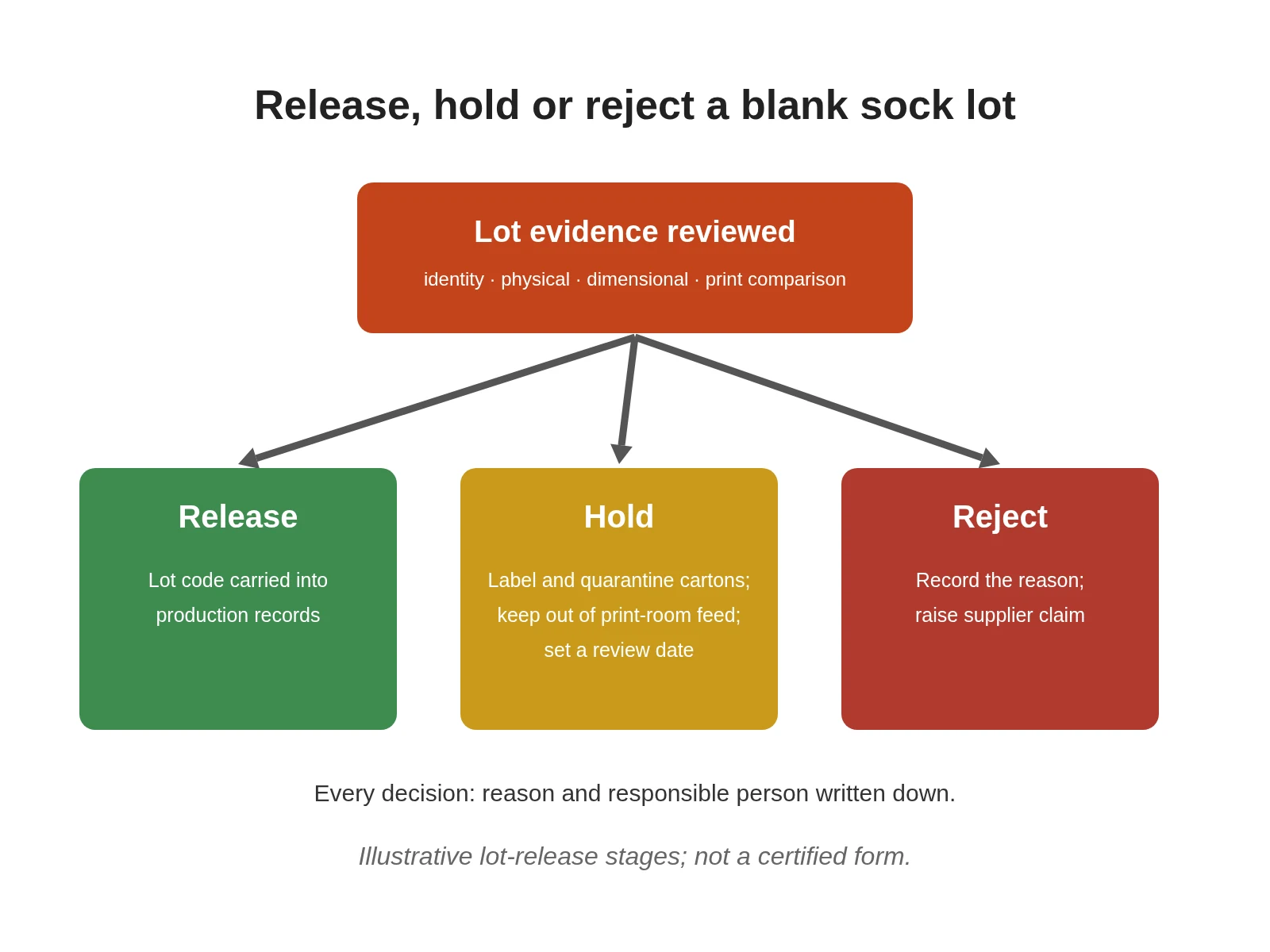
Make an explicit decision for every delivery:
| Field | What to enter |
|---|---|
| Lot identity | Supplier, PO/delivery note, lot code, blank SKU, size, fiber declaration |
| Receipt | Delivery date, carton count, stated vs counted quantity |
| Physical result | Packaging, cleanliness, defects, odor/contamination notes |
| Dimensional result | Sample size, measurements vs blank spec, roller-chart compatibility |
| Print comparison | Sock printer settings used, finishing route, vs retained reference |
| Decision | Release / Hold / Reject, with reason and responsible person |
| Disposition | Quarantine location, supplier claim, or production release date |
A hold is not a quiet delay. Label quarantined cartons, keep them out of the print-room feed and set a review date. Released lots should carry the lot code into production records.
For equipment trials that use these blanks, pair this record with a documented sock printer output test so accepted-pair counts stay tied to identified material.
7. What to send suppliers — and when to ask Colorido
When a lot fails, send the supplier the lot code, label and defect photos, measurement notes and the print comparison against the retained reference. Ask whether yarn, finishing or size control changed since the last approved delivery.
For print-ready blanks matched to Colorido workflows, start with blank polyester socks or blank cotton socks, keeping selection criteria on the blank-socks guide linked above. For finished goods instead of blank inventory, use the custom printed socks hub. Print rooms expanding capacity can review the Colorido sock printer range once blank quality is under control.
Frequently Asked Questions
What is blank socks incoming inspection?
It is the lot-release check performed when blank socks arrive: confirm identity, count and packaging, inspect cleanliness and defects, sample dimensions against your blank specification, then run a controlled print comparison before the lot enters production.
How many pairs should I sample from each delivery?
Sample enough pairs from enough cartons to represent the delivery, including more than one size if the shipment mixes sizes. Increase the sample when the supplier is new, the blank is newly qualified, or the last lot showed variation.
Do I need a print test if the blanks look clean and white?
Yes. Surface appearance does not prove ink uptake, stretch behavior or finishing response. A small sample printed and finished with production-intent settings catches lot changes that visual checks miss.
Is incoming inspection the same as customer sample approval?
No. Incoming inspection releases a blank lot for the print room. Customer sample approval judges finished artwork, color and fit for a specific order and should follow only after blanks are released.
What should I keep as a retained reference?
Keep approved blank pairs and a finished print from a previously released lot of the same blank specification. Store them clean and labeled so new deliveries have a physical comparison, not only a screen image.
What if only part of a delivery fails?
Quarantine the failing cartons or sizes, document the split decision and do not mix held goods into released stock. Ask the supplier to replace or credit the rejected portion before those blanks reach the sock printer.
Leave A Comment